
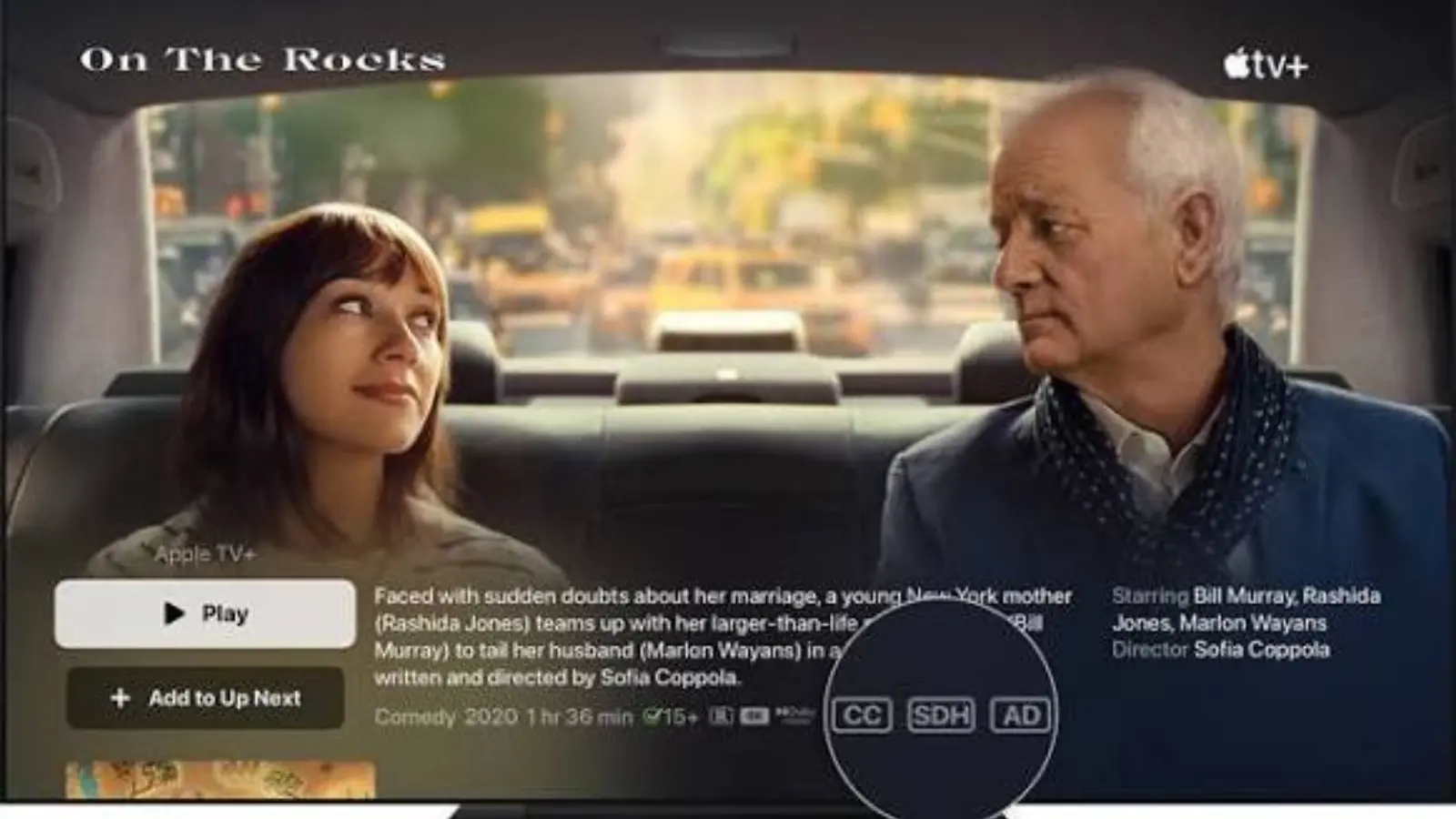
Subtitles vs closed captions refers to the difference between two forms of on-screen text that help viewers understand video content.
Subtitles primarily display spoken dialogue, while closed captions include dialogue plus relevant sound effects, speaker identification, and other important audio information.
Although people often use these terms interchangeably, they serve different purposes.
Subtitles are especially useful for viewers who speak another language or watch videos without sound.
Closed captions are designed to make audiovisual content accessible to people who are deaf or hard of hearing, while also helping viewers understand important sounds and conversations.
Both formats have become essential across streaming platforms, online education, entertainment, business presentations, and social media.
From watching Netflix and YouTube videos to creating Instagram Reels and marketing campaigns, understanding the difference helps creators choose the right format.
This comprehensive guide explains how subtitles and closed captions work, their differences, practical examples, accessibility benefits, formatting standards, and best practices for improving video engagement and visibility.
1. Understanding the Core Meaning Behind Subtitles and Closed Captions
Before comparing these formats, it is important to understand what each one communicates and why viewers depend on them.
1. What are subtitles? Subtitles are written versions of spoken dialogue displayed on a video screen. They help viewers follow conversations, particularly when the audio is in a language they do not understand.
2. What are closed captions? Closed captions are synchronized text descriptions of spoken dialogue and meaningful audio information. They can identify speakers, describe sound effects, and communicate other important auditory details.
3. The primary purpose of subtitles. Subtitles generally focus on translating or transcribing spoken words so viewers can understand the conversation without relying entirely on the original audio.
4. The primary purpose of closed captions. Closed captions provide an alternative way to access the audio experience. They communicate information that someone who cannot hear the soundtrack might otherwise miss.
5. How subtitles appear. Subtitles usually appear near the bottom of the video and display dialogue in the original language or a translated language.
6. How closed captions appear. Closed captions may appear at the bottom or another suitable screen position. They can include descriptions such as [door slams], [audience applauds], or [dramatic music].
7. Who benefits from subtitles? People learning languages, international audiences, viewers in noisy environments, and anyone who prefers reading dialogue can benefit from subtitles.
8. Who benefits from closed captions? Deaf and hard-of-hearing viewers are the primary audience, although captions are also useful for people watching videos in quiet or noisy environments.
9. The role of synchronization. Both formats need accurate timing. Text should appear when the corresponding words or sounds occur and disappear when they are no longer relevant.
10. The importance of accuracy. Incorrect dialogue, missing words, or poorly timed descriptions can change the meaning of a scene and create confusion.
11. Their role in digital entertainment. Streaming services, educational websites, video platforms, and broadcasters use subtitles and captions to serve audiences with different communication needs.
12. Why the distinction matters. Understanding the difference helps content creators, publishers, educators, and businesses select a format that delivers the intended viewing experience.
2. Exploring the Most Important Differences Between the Two Formats
Subtitles and closed captions may look similar, but their content, intended audience, and accessibility functions are not identical.
1. Dialogue versus complete audio information. Subtitles typically communicate spoken dialogue, whereas closed captions include dialogue and relevant non-speech audio information.
2. Translation requirements. Subtitles frequently translate dialogue into another language. Closed captions are often written in the same language as the original audio, although translated caption formats are also possible.
3. Accessibility objectives. Subtitles commonly support language comprehension, while closed captions provide access to audio information for people who cannot hear it.
4. Sound descriptions. Closed captions can describe meaningful sounds, including [phone rings] or [thunder crashes]. Standard dialogue-focused subtitles may leave these sounds undescribed.
5. Speaker identification. Closed captions can identify speakers when the identity is not obvious from the visual context. Subtitles may use speaker labels when necessary, particularly in translated or complex scenes.
6. Music information. Closed captions may describe relevant music, such as [soft piano music] or [tense music builds]. Subtitles generally prioritize dialogue, although some subtitle formats include additional sound descriptions.
7. Presentation style. Subtitles often use a simple text presentation. Closed captions may include positioning, speaker labels, sound descriptions, and other formatting conventions.
8. Viewer interaction. Closed captions are commonly designed to be switched on or off through a player control. Open subtitles are permanently visible, while selectable subtitles can be enabled or disabled.
9. Content production. Subtitle production often involves transcription, translation, timing, and linguistic review. Caption production additionally requires identifying meaningful audio cues and speaker information.
10. Use in education. Subtitles can support language learning and comprehension. Captions can help learners access lectures, discussions, demonstrations, and important sound-based information.
11. Use in entertainment. Subtitles make international movies and television programs understandable across languages. Captions provide a more complete textual representation of the audio experience.
12. Choosing the appropriate format. Select subtitles when dialogue translation or reading support is the main goal. Choose accurate closed captions when the objective is to make the full meaningful audio experience accessible.
The distinction is not simply about how the text looks. It is about what information the text communicates and which viewer needs it is intended to address.
3. Recognizing Real-World Examples That Make the Difference Clear
Examples make it easier to identify when a video needs subtitles and when it needs closed captions.
1. A foreign-language movie. Imagine watching a Spanish movie with English dialogue translation displayed at the bottom. These are English subtitles because they communicate the meaning of the spoken Spanish.
2. An English-language interview. An interview displaying the exact spoken English words may use same-language subtitles or captions, depending on its purpose and whether it includes relevant sound information.
3. A musical performance. A captioned concert might display [crowd cheers], [guitar solo], and lyrics when they are important to understanding the performance.
4. A classroom lecture. A lecture captioning system may display the instructor’s words, identify different speakers, and include meaningful audio descriptions when necessary.
5. A documentary. Subtitles can translate a documentary narrator’s dialogue, while captions can communicate background sounds that contribute important information to the scene.
6. A silent social media video. A video containing spoken dialogue may include subtitles so viewers can follow the message without turning on their sound.
7. A dramatic television scene. Captions may communicate [door creaks], [footsteps approaching], or [whispers], helping viewers understand sounds that affect the storyline.
8. A live news broadcast. Live captions display speech as it is delivered, allowing viewers to follow news reports without depending on audio.
9. A sports broadcast. Captions can identify commentary and meaningful sounds, such as [whistle blows] or [crowd erupts], when these cues contribute to understanding the event.
10. A cooking tutorial. Subtitles may translate the chef’s instructions, while captions can describe important audio cues such as [timer beeps].
11. A corporate presentation. Translated subtitles can support international employees, while same-language captions can make meetings and training videos more accessible.
12. An animated video. Subtitles may communicate character dialogue, while captions can include sound effects such as [robot beeps] or [explosion].
These examples demonstrate that subtitles and captions are complementary formats. Depending on the content, a video may benefit from both translation and complete audio accessibility.
4. Understanding Open Captions, Closed Captions, and Subtitle Display Options
Another important part of the subtitles versus closed captions discussion is understanding how text is displayed. Not every caption track works in the same way.
1. Closed captions (CC). Closed captions are text tracks that viewers can generally enable or disable through compatible video players. They provide synchronized dialogue and relevant audio descriptions.
2. Open captions. Open captions are permanently embedded into the video image. Viewers cannot switch them off because they form part of the actual video picture.
3. Open subtitles. Open subtitles are subtitles burned directly into a video. They remain visible regardless of the playback device or player settings.
4. Closed subtitles. Selectable subtitle tracks allow viewers to turn text on or off and, in many cases, select a preferred language.
5. Embedded text. When captions are embedded into a video, they become part of its visual presentation. This makes them reliable across platforms but limits customization.
6. Separate caption files. Caption files store text and timing information separately from the video. Formats such as SRT and WebVTT can be used to provide synchronized text tracks.
7. Viewer customization. Selectable captions may allow viewers to adjust font size, color, background, and positioning, depending on the platform and playback device.
8. Accessibility considerations. Open captions can help when a platform does not support selectable captions. However, selectable closed captions offer viewers greater control over their viewing experience.
9. Translation flexibility. Multiple subtitle tracks can provide different languages without requiring separate video uploads. This is particularly useful for international streaming services.
10. Mobile viewing. Open captions are often convenient for short-form videos because viewers can immediately read the dialogue without searching for a settings menu.
11. Platform compatibility. Different platforms support different caption formats and controls. Creators should check compatibility before uploading videos to multiple destinations.
12. Making the right choice. Use closed captions when viewer control and accessibility are priorities. Consider open captions when text must remain visible across different playback environments.
The World Wide Web Consortium (W3C) explains that captions can be turned on and off, whereas open captions remain visible because they are embedded in the video. W3C+1
5. Discovering How Subtitles and Captions Improve Accessibility
Accessibility is one of the strongest reasons to include accurate text with video content. It ensures that people with different hearing abilities, language backgrounds, and viewing preferences can access information.
1. Supporting deaf viewers. Closed captions provide access to spoken information and meaningful sounds for viewers who cannot hear the original soundtrack.
2. Helping hard-of-hearing audiences. People with partial hearing loss may find captions useful when dialogue is difficult to understand because of background noise or unclear pronunciation.
3. Improving language comprehension. Subtitles help international audiences follow videos by displaying dialogue in a language they understand.
4. Supporting language learners. Watching a video while reading subtitles can help learners connect spoken vocabulary with written words and sentence structures.
5. Making educational videos inclusive. Captions allow students to access lecture material even when they cannot rely on audio alone.
6. Reducing environmental barriers. People watching videos in public transportation, libraries, offices, or shared spaces can understand the content without increasing the volume.
7. Improving concentration. Some viewers find that reading synchronized text helps them follow complex discussions, technical explanations, and fast conversations.
8. Communicating emotional context. Descriptions such as [laughing], [sarcastically], or [whispering] can communicate important elements of a speaker’s delivery.
9. Supporting different learning preferences. Combining visual information, spoken language, and written text gives audiences another way to process information.
10. Making live information accessible. Live captions can help viewers follow webinars, broadcasts, online classes, and virtual events as they happen.
11. Supporting independent viewing. Accessible caption options give viewers greater control over how they consume information without needing someone else to explain the audio.
12. Encouraging inclusive publishing. Adding accurate captions demonstrates that a creator or organization has considered the needs of a wider audience.
The W3C’s accessibility guidance emphasizes that captions should communicate both speech and meaningful non-speech audio needed to understand prerecorded media. W3C+1
6. Learning How Caption Files, Timing, and Synchronization Work
Captions are more than words placed at the bottom of a screen. They depend on timing, formatting, and accurate synchronization to create a useful viewing experience.
1. Understanding SRT files. SubRip Subtitle (SRT) is a widely used subtitle and caption format containing numbered entries, timestamps, and text.
2. Understanding WebVTT files. Web Video Text Tracks (WebVTT) is a format designed for displaying timed text with web-based video. It supports features such as cues and positioning.
3. Using timestamps. Each caption entry needs start and end times that determine when the text appears and disappears.
4. Maintaining synchronization. Captions should appear when dialogue or relevant sounds occur. Delayed text can confuse viewers and reduce comprehension.
5. Managing reading speed. Text should remain visible long enough for viewers to read comfortably without missing the next important scene.
6. Breaking long sentences. Dividing dialogue into logical phrases makes captions easier to follow, especially on mobile screens.
7. Handling multiple speakers. When two or more people are talking, clear speaker identification helps viewers understand who is communicating.
8. Describing important sounds. Sound descriptions should explain meaningful audio events without unnecessarily documenting every minor background noise.
9. Maintaining punctuation. Correct punctuation communicates sentence structure, questions, interruptions, and changes in speaker tone.
10. Choosing readable formatting. Use sufficient contrast, a legible font, and sensible positioning so captions do not obscure important visual information.
11. Checking synchronization after editing. Cutting scenes, changing video speed, or replacing audio can affect caption timing. Review the final exported video before publishing.
12. Testing different devices. Preview captions on phones, tablets, computers, and televisions to identify display problems before distributing the video.
The U.S. Section 508 accessibility guidance recommends synchronized text, accurate dialogue, meaningful sound descriptions, and sufficient display time. Section508.gov+1
7. Choosing Between Subtitles and Closed Captions on Streaming Platforms
Streaming services have made subtitles and captions a standard part of the entertainment experience. However, available options can vary by title, region, language, and device.
1. Netflix viewing. Netflix provides audio and subtitle options for supported titles. Viewers should check the playback language menu to find available choices.
2. YouTube videos. YouTube supports subtitles and captions that creators can upload, edit, or generate through supported features.
3. Amazon Prime Video. Prime Video offers subtitle and caption options for supported content, with availability depending on the title and region.
4. Disney+ entertainment. Disney+ provides language and accessibility options for supported movies and television programs.
5. Live television. Closed captions are particularly important for live news, interviews, sports, and other broadcasts where viewers need access to spoken information.
6. International movies. Translated subtitles allow viewers to enjoy films produced in different languages while preserving the original audio performance.
7. Documentary programming. Captions help communicate narration, interviews, and meaningful environmental sounds that contribute to understanding the subject.
8. Animated entertainment. Captions can identify characters and describe distinctive sound effects, while subtitles communicate translated character dialogue.
9. Sports streaming. Captions help viewers follow commentators, interviews, and important audio events during live sporting broadcasts.
10. Device compatibility. A subtitle track available on a television app may not always appear in exactly the same way on another device.
11. Language preferences. Some streaming services remember a viewer’s preferred subtitle language, making repeated selections more convenient.
12. Checking available features. Before starting a movie or series, open the audio and subtitle settings to identify the available languages and accessibility options.
Helpful tip: On YouTube, creators can manage subtitle and caption tracks through YouTube Studio. The platform also supports uploading files containing text and timestamps. YouTube Help
8. Creating Better Instagram Reels With Subtitles and Captions
Instagram Reels have become an important format for creators, businesses, educators, and entertainment accounts. Text can make short videos easier to understand, especially when viewers watch without sound.
1. Add readable dialogue text. If someone speaks in a Reel, displaying accurate text can help viewers understand the message without turning on their audio.
2. Use automatic captions carefully. Automatic speech recognition can save time, but it may misunderstand names, slang, technical terms, or accents.
3. Review every generated sentence. Correct transcription errors before publishing because even a small mistake can change the meaning of a message.
4. Choose a clear text style. Select a readable font, suitable size, and strong contrast against the background.
5. Keep text away from interface elements. Position subtitles where Instagram’s interface buttons and descriptions are less likely to cover them.
6. Use short caption segments. Break long spoken sentences into manageable sections that viewers can read while watching the video.
7. Include important sound information. For accessibility-focused captioning, include meaningful audio cues that are not already obvious from the visuals.
8. Make videos understandable without audio. Use a combination of subtitles, meaningful visuals, and on-screen context so the central message remains clear.
9. Write an engaging post caption. The written Instagram caption should explain the Reel’s subject and provide additional context rather than simply repeating every spoken word.
10. Select relevant hashtags. Hashtags such as #VideoAccessibility, #InstagramReels, and #ContentCreation may be appropriate when they accurately describe the subject.
11. Monitor engagement rate. Review views, shares, saves, comments, and watch time to understand how viewers interact with accessible video content.
12. Maintain consistent accessibility standards. Review text accuracy, contrast, positioning, and sound descriptions before publishing every Reel.
Instagram supports caption features for eligible video formats, although availability and controls can vary. Independent accessibility guidance also recommends checking automatic captions before publishing. RNID+2
9. Improving Video SEO, Search Visibility, and Audience Engagement
Subtitles and captions can contribute to a better video experience, but creators should understand how they relate to search engine optimization and social media growth.
1. Improve content understanding. Accurate text helps viewers understand the subject and message of a video, particularly when the original audio is difficult to follow.
2. Support international audiences. Translated subtitles make videos accessible to people who speak different languages, potentially expanding the audience interested in the content.
3. Create descriptive video titles. Include the main topic in a natural, informative title that accurately represents the video.
4. Write useful descriptions. Explain the content, mention important subjects, and provide relevant links where appropriate.
5. Use relevant keywords naturally. Terms such as subtitles, closed captions, video accessibility, transcription, and multilingual content can clarify a video’s subject.
6. Add accurate transcripts. A transcript provides a text version of the spoken content and can help audiences review information outside the video itself.
7. Choose meaningful hashtags. Relevant hashtags help categorize social media posts, although they do not guarantee improved search ranking or reach.
8. Improve audience retention. Readable text may make fast dialogue and complex explanations easier to follow, helping viewers remain engaged with the content.
9. Encourage meaningful interaction. Ask viewers useful questions about the topic rather than relying on repetitive engagement requests.
10. Use accessible thumbnails. A descriptive thumbnail with readable text helps communicate the video’s subject before viewers open it.
11. Measure content performance. Track impressions, click-through rate, watch time, completion rate, and engagement to understand how different formats perform.
12. Avoid exaggerated SEO promises. Captions alone do not guarantee higher rankings, viral Reels, or improved visibility. They should support a broader content strategy.
A useful approach is to combine accurate captions with clear titles, informative descriptions, accessible visuals, and consistent publishing. This creates a stronger overall experience for both audiences and content platforms.
10. Avoiding Common Mistakes When Adding Subtitles and Closed Captions
Even a well-produced video can become difficult to understand when its subtitles or captions contain errors. Avoiding common mistakes improves accessibility, readability, and overall content quality.
1. Relying entirely on automatic transcription. Automatic captioning can misinterpret words, accents, names, and background speech. Always review generated text before publishing.
2. Ignoring meaningful sound effects. Captions that include dialogue but omit important sounds may leave deaf and hard-of-hearing viewers without essential information.
3. Using incorrect timestamps. Text that appears too early or too late can make conversations difficult to follow. Check synchronization throughout the entire video.
4. Displaying too much text. Long blocks of text can overwhelm viewers. Break dialogue into manageable phrases while preserving the original meaning.
5. Choosing difficult fonts. Decorative fonts, tiny text, and poor contrast can make captions inaccessible, particularly on smaller mobile screens.
6. Placing text over important visuals. Avoid covering faces, demonstrations, charts, or other information viewers need to see.
7. Ignoring speaker identification. When multiple people speak, unclear speaker labels can make conversations confusing.
8. Using inaccurate translations. Literal translations may lose context, humor, or cultural meaning. Review translated subtitles for natural language and accuracy.
9. Forgetting background music. Music can communicate emotion or provide important context. Include relevant descriptions when they contribute to understanding.
10. Failing to review exported videos. Caption tracks can become misaligned after editing. Always inspect the final version rather than relying only on the original editing timeline.
11. Confusing subtitles with complete accessibility captions. A dialogue-only subtitle track does not necessarily communicate all important audio information. Use an appropriate caption track when accessibility is the objective.
12. Ignoring audience feedback. If viewers report missing words, unreadable text, or timing problems, investigate and correct the issue rather than dismissing the feedback.
A final accessibility review should be part of every video publishing workflow. Small improvements can make a significant difference to the viewing experience.
11. Following Captioning Standards and Best Practices for Professional Videos
Professional captioning requires more than converting speech into written sentences. It involves accuracy, accessibility, synchronization, and compliance with relevant standards.
1. Understand WCAG requirements. The Web Content Accessibility Guidelines provide internationally recognized recommendations for accessible digital content, including captions for prerecorded and live media.
2. Include all meaningful dialogue. Captions should accurately represent spoken words rather than unnecessarily rewriting or summarizing conversations.
3. Describe essential non-speech audio. Include meaningful sound effects, music, laughter, and other audio cues that contribute to understanding.
4. Identify speakers clearly. Use names, roles, or other appropriate labels when viewers cannot easily identify the person speaking.
5. Maintain accurate timing. Synchronize each text segment with the corresponding speech or sound.
6. Use appropriate punctuation. Correct punctuation helps communicate questions, interruptions, pauses, and changes in dialogue.
7. Choose suitable line breaks. Break text into logical phrases rather than splitting sentences at awkward points.
8. Maintain visual contrast. Ensure captions remain distinguishable from the video background. A suitable background or outline can improve readability.
9. Avoid obstructing important information. Caption placement should not hide meaningful visual content, particularly when videos include demonstrations or presentations.
10. Review translated content. Professional translation should preserve meaning, context, tone, and relevant cultural references.
11. Test accessibility across devices. Verify that captions display correctly on different screen sizes, operating systems, and compatible video players.
12. Keep accessibility documentation. Businesses and educational organizations should maintain a consistent workflow for caption creation, review, corrections, and publication.
The W3C provides guidance through its WCAG captions documentation. For additional practical recommendations, consult Section 508 captions and transcripts guidance.
Following recognized standards helps creators produce videos that are easier to understand and more inclusive.
12. Building a Future-Ready Video Content Strategy With Subtitles and Captions
As online video continues to evolve, subtitles and closed captions will remain important parts of digital communication. Creators who make accessibility a priority can develop content that serves a wider range of viewers.
1. Make accessibility part of content planning. Decide which captioning and subtitle options your video needs before recording or editing begins.
2. Create accurate source transcripts. Start with a reliable transcript of the original dialogue. This makes it easier to prepare captions, translations, and supporting written content.
3. Develop multilingual versions. If your audience includes international viewers, consider providing professionally reviewed translations in relevant languages.
4. Use human review alongside automation. Automatic transcription can accelerate production, but human review remains important for accuracy, context, and sound descriptions.
5. Create platform-specific versions. A YouTube video, Instagram Reel, TikTok clip, and website video may require different caption formats and presentation styles.
6. Prioritize mobile readability. Short-form videos are frequently viewed on smartphones. Make sure text remains clear, appropriately positioned, and easy to read.
7. Build a consistent publishing workflow. Include transcription, editing, synchronization, accessibility review, and final quality checks in your regular production process.
8. Combine captions with strong social media writing. Use informative Instagram captions, descriptive Reels text, and relevant hashtags to communicate the topic and encourage meaningful engagement.
9. Monitor audience behavior. Evaluate video completion, watch time, shares, saves, comments, and engagement rate to understand how audiences respond.
10. Stay informed about platform changes. Video platforms regularly update accessibility features, subtitle support, and publishing options. Review their official documentation periodically.
11. Listen to your audience. Feedback from deaf, hard-of-hearing, multilingual, and other viewers can reveal accessibility problems that automated checks might overlook.
12. Treat accessibility as long-term value. Accurate subtitles and closed captions improve communication, support inclusion, and help create a more dependable digital content experience.
A future-ready strategy does not simply add text to videos. It considers how different people receive information and makes the content understandable across languages, devices, and viewing environments.
Conclusion: Subtitles vs Closed Captions Which One Should You Choose?
Understanding subtitles vs closed captions helps viewers, creators, educators, and businesses make better decisions about video accessibility and communication.
The main difference is straightforward: subtitles primarily communicate spoken dialogue, often through translation, while closed captions communicate dialogue and meaningful non-speech audio information.
Closed captions are especially important for deaf and hard-of-hearing viewers because they provide access to information that would otherwise be available only through sound.
Both formats have valuable applications.
Subtitles support international audiences, language learners, and people watching videos without sound.
Closed captions provide a more complete textual representation of audio, including speaker identification, music, and important sound effects.
For content creators, the best approach is to select the format according to the audience’s needs.
Review automatic transcription carefully, maintain accurate synchronization, use readable text, and check accessibility across devices.
If you publish on Instagram, YouTube, or other social media platforms, combine accurate video text with descriptive post captions, relevant hashtags, and engaging content.
Monitor engagement rate, watch time, and audience feedback to improve your publishing strategy.
Your next step: Review your latest video and ask whether someone who cannot hear its audio could understand all the important information. If not, improve its captions before publishing.
Accessible videos create better viewing experiences, support wider audiences, and make digital communication more inclusive. 🎬

Noah Parker enjoys creating original pick up lines that are funny, smooth, and easy to use. He writes playful content inspired by online trends, dating culture, and everyday conversations.